功能整合
除了 LlmChatView 自動提供的功能外,還有許多整合點允許您的應用與其他功能無縫融合,以提供額外的功能
- 歡迎訊息:向用戶顯示初始問候語。
- 建議提示:向用戶提供預定義提示以指導互動。
- 系統指令:向 LLM 提供特定輸入以影響其響應。
- 停用附件和音訊輸入:移除聊天 UI 的可選部分。
- 管理取消或錯誤行為:更改使用者取消或 LLM 錯誤行為。
- 管理歷史記錄:每個 LLM 提供程式都允許管理聊天曆史記錄,這對於清除它、動態更改它以及在會話之間儲存它非常有用。
- 聊天序列化/反序列化:在應用會話之間儲存和檢索對話。
- 自定義響應小部件:引入專門的 UI 元件來呈現 LLM 響應。
- 自定義樣式:定義獨特的視覺樣式,使聊天外觀與整體應用相匹配。
- 無 UI 聊天:直接與 LLM 提供程式互動,而不影響使用者的當前聊天會話。
- 自定義 LLM 提供程式:構建您自己的 LLM 提供程式,以將聊天與您自己的模型後端整合。
- 重新路由提示:除錯、記錄或重新路由傳送給提供程式的訊息,以跟蹤問題或動態路由提示。
歡迎訊息
#聊天檢視允許您提供自定義歡迎訊息,為使用者設定上下文
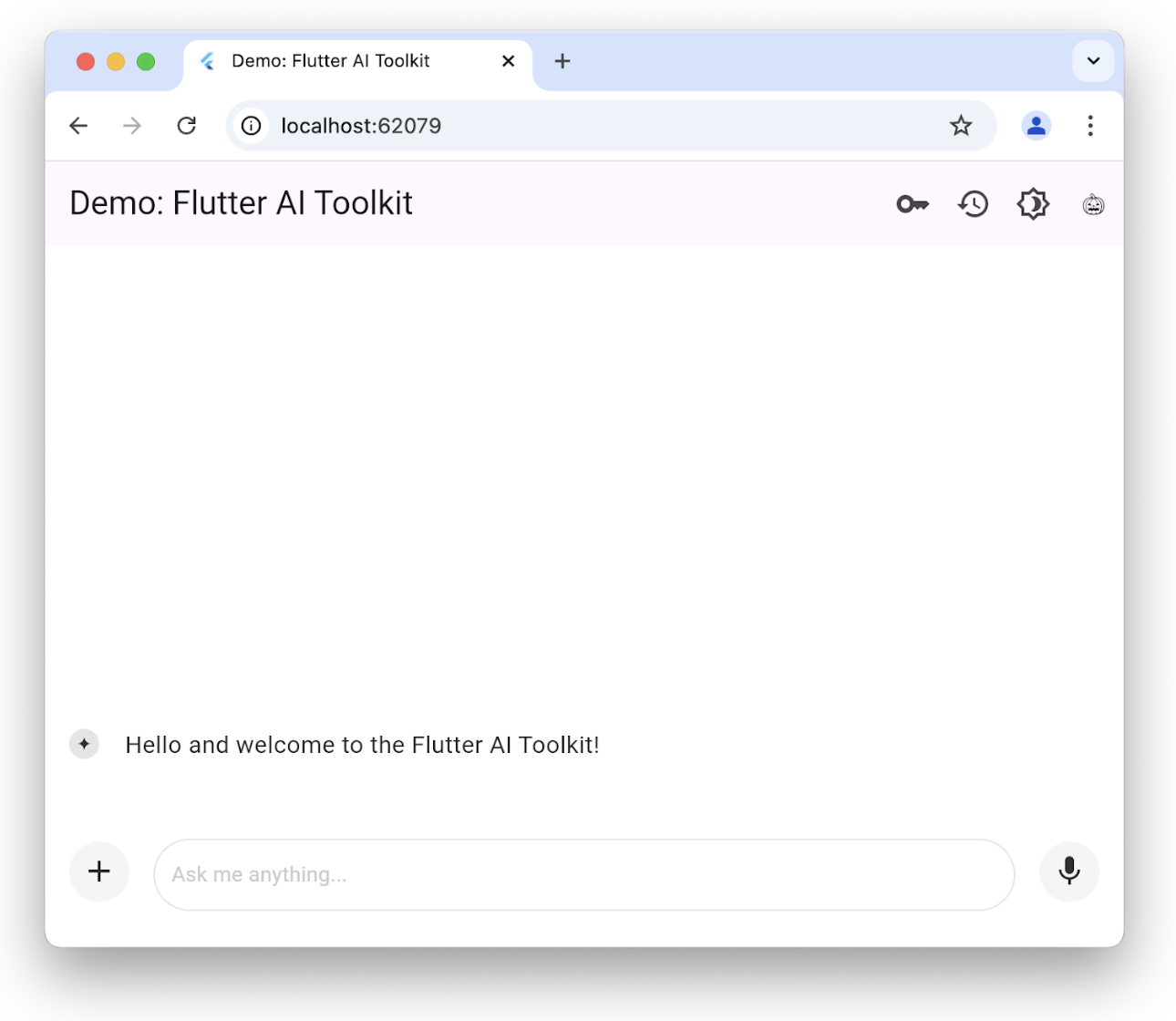
您可以透過設定 welcomeMessage 引數來初始化帶有歡迎訊息的 LlmChatView
class ChatPage extends StatelessWidget {
 const ChatPage({super.key});

 @override
 Widget build(BuildContext context) => Scaffold(
       appBar: AppBar(title: const Text(App.title)),
       body: LlmChatView(
         welcomeMessage: 'Hello and welcome to the Flutter AI Toolkit!',
         provider: GeminiProvider(
           model: GenerativeModel(
             model: 'gemini-2.0-flash',
             apiKey: geminiApiKey,
           ),
         ),
       ),
     );
}要檢視設定歡迎訊息的完整示例,請檢視歡迎示例。
建議提示
#您可以提供一組建議提示,讓使用者瞭解聊天會話已針對哪些方面進行了最佳化
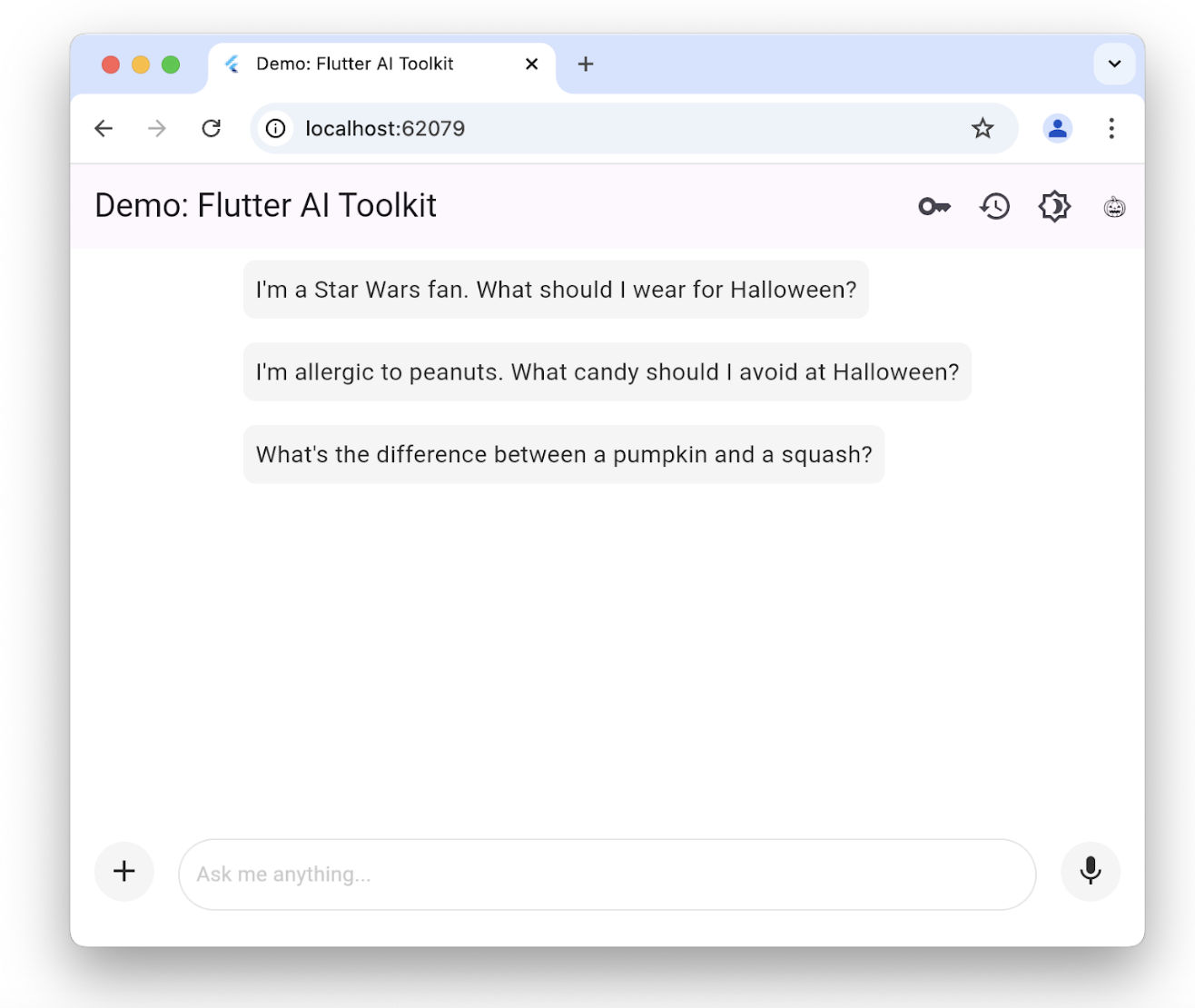
僅當沒有現有聊天曆史記錄時才顯示建議。單擊其中一個會將文字複製到使用者的提示編輯區域。要設定建議列表,請使用 suggestions 引數構造 LlmChatView
class ChatPage extends StatelessWidget {
 const ChatPage({super.key});

 @override
 Widget build(BuildContext context) => Scaffold(
       appBar: AppBar(title: const Text(App.title)),
       body: LlmChatView(
         suggestions: [
           'I\'m a Star Wars fan. What should I wear for Halloween?',
           'I\'m allergic to peanuts. What candy should I avoid at Halloween?',
           'What\'s the difference between a pumpkin and a squash?',
         ],
         provider: GeminiProvider(
           model: GenerativeModel(
             model: 'gemini-2.0-flash',
             apiKey: geminiApiKey,
           ),
         ),
       ),
     );
}要檢視為使用者設定建議的完整示例,請檢視建議示例。
LLM 指令
#為了根據您的應用需求最佳化 LLM 的響應,您需要為其提供指令。例如,食譜示例應用使用 GenerativeModel 類的 systemInstructions 引數來調整 LLM,使其專注於根據使用者指令提供食譜
class _HomePageState extends State<HomePage> {
  ...
  // create a new provider with the given history and the current settings
  LlmProvider _createProvider([List<ChatMessage>? history]) => GeminiProvider(
      history: history,
        ...,
        model: GenerativeModel(
          model: 'gemini-2.0-flash',
          apiKey: geminiApiKey,
          ...,
          systemInstruction: Content.system('''
You are a helpful assistant that generates recipes based on the ingredients and
instructions provided as well as my food preferences, which are as follows:
${Settings.foodPreferences.isEmpty ? 'I don\'t have any food preferences' : Settings.foodPreferences}

You should keep things casual and friendly. You may generate multiple recipes in a single response, but only if asked. ...
''',
          ),
        ),
      );
  ...
}設定系統指令對於每個提供程式都是獨特的;GeminiProvider 和 VertexProvider 都允許您透過 systemInstruction 引數提供它們。
請注意,在這種情況下,我們將使用者偏好作為 LLM 提供程式建立的一部分引入,並傳遞給 LlmChatView 建構函式。每次使用者更改偏好時,我們都會將指令作為建立過程的一部分進行設定。食譜應用允許使用者使用支架上的抽屜更改他們的食物偏好
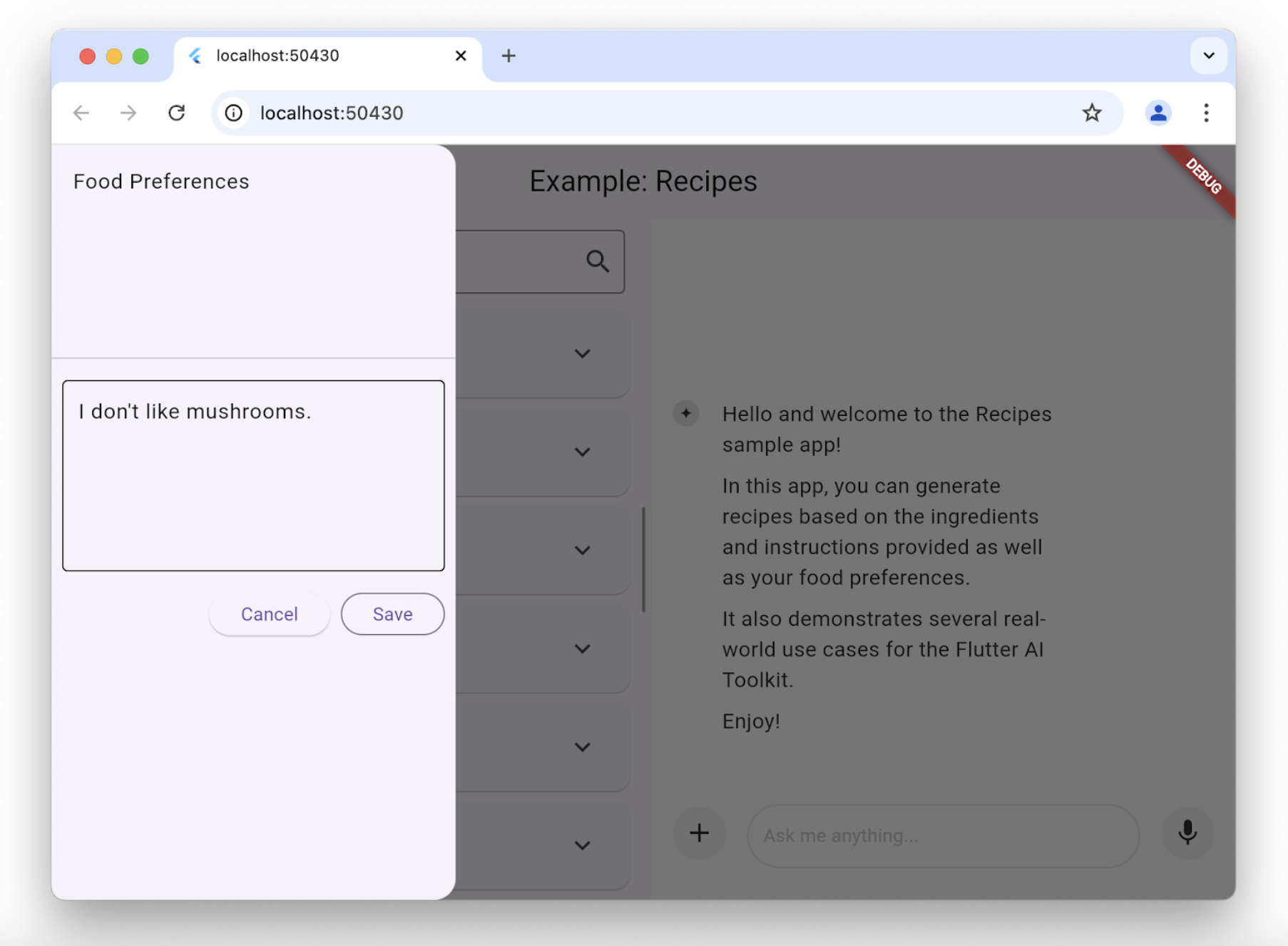
每當使用者更改他們的食物偏好時,食譜應用都會建立一個新模型來使用新偏好
class _HomePageState extends State<HomePage> {
  ...
  void _onSettingsSave() => setState(() {
        // move the history over from the old provider to the new one
        final history = _provider.history.toList();
        _provider = _createProvider(history);
      });
}
停用附件和音訊輸入
#如果您想停用附件(+ 按鈕)或音訊輸入(麥克風按鈕),您可以透過 LlmChatView 建構函式中的 enableAttachments 和 enableVoiceNotes 引數來完成
class ChatPage extends StatelessWidget {
  const ChatPage({super.key});

  @override
  Widget build(BuildContext context) {
    // ...

    return Scaffold(
      appBar: AppBar(title: const Text('Restricted Chat')),
      body: LlmChatView(
        // ...
        enableAttachments: false,
        enableVoiceNotes: false,
      ),
    );
  }
}
這兩個標誌都預設為 true。
管理取消或錯誤行為
#預設情況下,當用戶取消 LLM 請求時,LLM 的響應將附加字串“CANCEL”,並彈出一個訊息,提示使用者已取消請求。同樣,在發生 LLM 錯誤時,例如網路連線斷開,LLM 的響應將附加字串“ERROR”,並彈出一個帶有錯誤詳細資訊的警報對話方塊。
您可以使用 LlmChatView 的 cancelMessage、errorMessage、onCancelCallback 和 onErrorCallback 引數覆蓋取消和錯誤行為。例如,以下程式碼替換了預設的取消處理行為
class ChatPage extends StatelessWidget {
  // ...

  void _onCancel(BuildContext context) {
    ScaffoldMessenger.of(
      context,
    ).showSnackBar(const SnackBar(content: Text('Chat cancelled')));
  }

  @override
  Widget build(BuildContext context) => Scaffold(
    appBar: AppBar(title: const Text(App.title)),
    body: LlmChatView(
      // ...
      onCancelCallback: _onCancel,
      cancelMessage: 'Request cancelled',
    ),
  );
}您可以覆蓋這些引數中的任何一個或所有引數,LlmChatView 將使用其預設值來處理您未覆蓋的任何內容。
管理歷史記錄
#定義所有可以插入聊天檢視的 LLM 提供程式的標準介面包括獲取和設定提供程式歷史記錄的功能
abstract class LlmProvider implements Listenable {
  Stream<String> generateStream(
    String prompt, {
    Iterable<Attachment> attachments,
  });

  Stream<String> sendMessageStream(
    String prompt, {
    Iterable<Attachment> attachments,
  });

  Iterable<ChatMessage> get history;
  set history(Iterable<ChatMessage> history);
}
當提供程式的歷史記錄更改時,它會呼叫 Listenable 基類公開的 notifyListener 方法。這意味著您可以手動使用 add 和 remove 方法訂閱/取消訂閱,或者使用它來構造 ListenableBuilder 類的例項。
generateStream 方法呼叫底層 LLM,而不影響歷史記錄。呼叫 sendMessageStream 方法會在響應完成後,透過向提供程式歷史記錄新增兩條新訊息(一條用於使用者訊息,一條用於 LLM 響應)來更改歷史記錄。聊天檢視在處理使用者的聊天提示時使用 sendMessageStream,在處理使用者的語音輸入時使用 generateStream。
要檢視或設定歷史記錄,您可以訪問 history 屬性
void _clearHistory() => _provider.history = [];訪問提供程式歷史記錄的能力在重新建立提供程式同時維護歷史記錄時也很有用
class _HomePageState extends State<HomePage> {
  ...
  void _onSettingsSave() => setState(() {
        // move the history over from the old provider to the new one
        final history = _provider.history.toList();
        _provider = _createProvider(history);
      });
}
_createProvider 方法使用來自上一個提供程式的歷史記錄和新的使用者偏好建立新的提供程式。這對使用者來說是無縫的;他們可以繼續聊天,但現在 LLM 會考慮到他們新的食物偏好來提供響應。例如
class _HomePageState extends State<HomePage> {
  ...
  // create a new provider with the given history and the current settings
  LlmProvider _createProvider([List<ChatMessage>? history]) =>
    GeminiProvider(
      history: history,
      ...
    );
  ...
}要檢視歷史記錄的實際應用,請檢視食譜示例應用和歷史記錄示例應用。
聊天序列化/反序列化
#要在應用會話之間儲存和恢復聊天曆史記錄,需要能夠序列化和反序列化每個使用者提示(包括附件)以及每個 LLM 響應。兩種型別的訊息(使用者提示和 LLM 響應)都公開在 ChatMessage 類中。序列化可以透過使用每個 ChatMessage 例項的 toJson 方法來完成。
Future<void> _saveHistory() async {
  // get the latest history
  final history = _provider.history.toList();

  // write the new messages
  for (var i = 0; i != history.length; ++i) {
    // skip if the file already exists
    final file = await _messageFile(i);
    if (file.existsSync()) continue;

    // write the new message to disk
    final map = history[i].toJson();
    final json = JsonEncoder.withIndent('  ').convert(map);
    await file.writeAsString(json);
  }
}
同樣,要反序列化,請使用 ChatMessage 類的靜態 fromJson 方法
Future<void> _loadHistory() async {
  // read the history from disk
  final history = <ChatMessage>[];
  for (var i = 0;; ++i) {
    final file = await _messageFile(i);
    if (!file.existsSync()) break;

    final map = jsonDecode(await file.readAsString());
    history.add(ChatMessage.fromJson(map));
  }

  // set the history on the controller
  _provider.history = history;
}
為確保序列化時的快速週轉,我們建議只寫入每條使用者訊息一次。否則,使用者每次都必須等待您的應用寫入每條訊息,並且在面對二進位制附件時,這可能需要一段時間。
要檢視實際應用,請檢視歷史記錄示例應用。
自定義響應小部件
#預設情況下,聊天檢視顯示的 LLM 響應是 Markdown 格式的。但是,在某些情況下,您希望建立一個自定義小部件來顯示特定於您的應用並與之整合的 LLM 響應。例如,當用戶在食譜示例應用中請求食譜時,LLM 響應用於建立一個特定於顯示食譜的小部件,就像應用的其餘部分一樣,並提供一個新增按鈕,以防使用者希望將食譜新增到他們的資料庫中
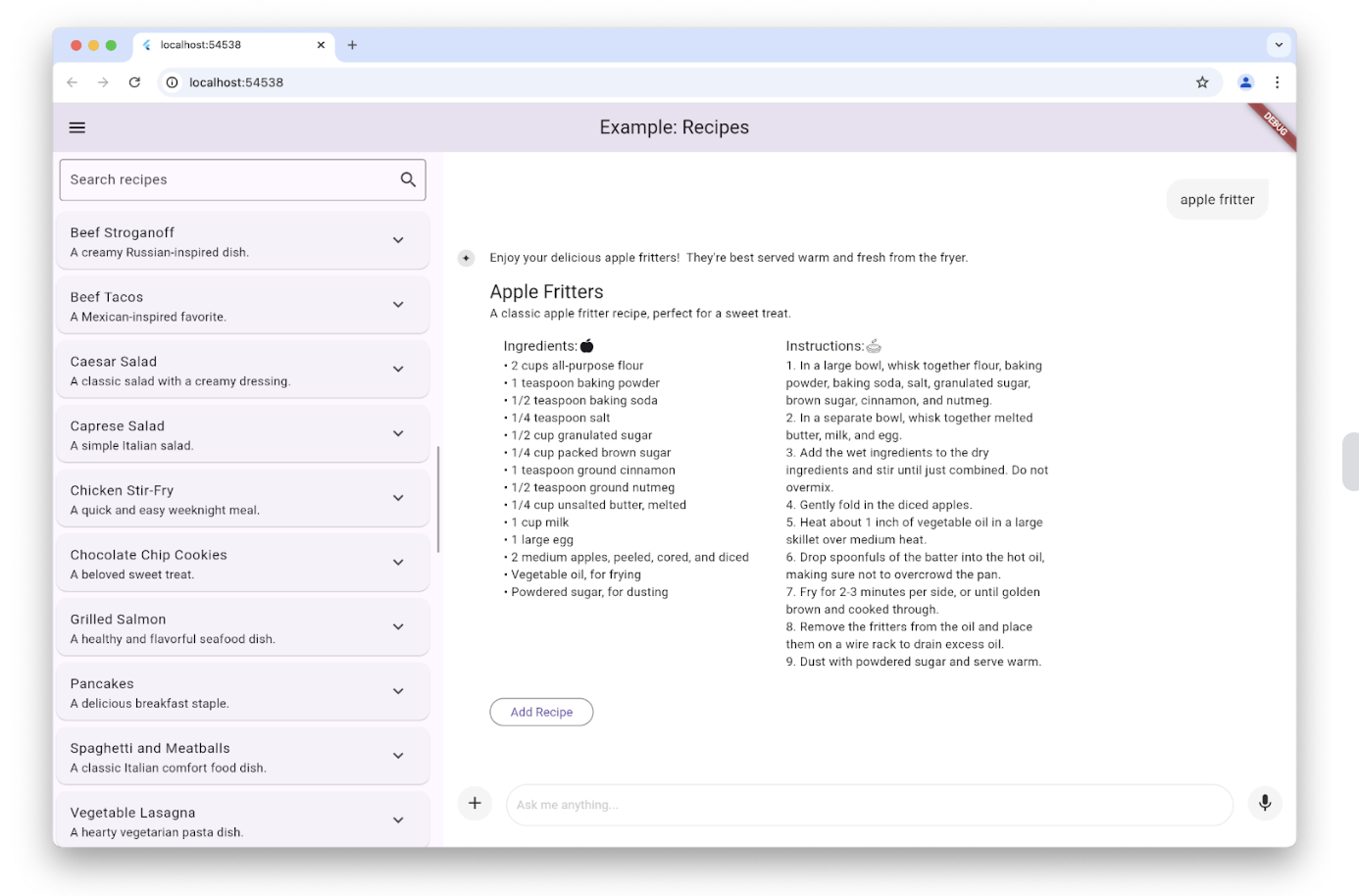
這可以透過設定 LlmChatView 建構函式的 responseBuilder 引數來完成
LlmChatView(
  provider: _provider,
  welcomeMessage: _welcomeMessage,
  responseBuilder: (context, response) => RecipeResponseView(
    response,
  ),
),在這個特定示例中,RecipeReponseView 小部件是使用 LLM 提供程式的響應文字構建的,並使用它來實現其 build 方法
class RecipeResponseView extends StatelessWidget {
  const RecipeResponseView(this.response, {super.key});
  final String response;

  @override
  Widget build(BuildContext context) {
    final children = <Widget>[];
    String? finalText;

    // created with the response from the LLM as the response streams in, so
    // many not be a complete response yet
    try {
      final map = jsonDecode(response);
      final recipesWithText = map['recipes'] as List<dynamic>;
      finalText = map['text'] as String?;

      for (final recipeWithText in recipesWithText) {
        // extract the text before the recipe
        final text = recipeWithText['text'] as String?;
        if (text != null && text.isNotEmpty) {
          children.add(MarkdownBody(data: text));
        }

        // extract the recipe
        final json = recipeWithText['recipe'] as Map<String, dynamic>;
        final recipe = Recipe.fromJson(json);
        children.add(const Gap(16));
        children.add(Column(
          crossAxisAlignment: CrossAxisAlignment.start,
          children: [
            Text(recipe.title, style: Theme.of(context).textTheme.titleLarge),
            Text(recipe.description),
            RecipeContentView(recipe: recipe),
          ],
        ));

        // add a button to add the recipe to the list
        children.add(const Gap(16));
        children.add(OutlinedButton(
          onPressed: () => RecipeRepository.addNewRecipe(recipe),
          child: const Text('Add Recipe'),
        ));
        children.add(const Gap(16));
      }
    } catch (e) {
      debugPrint('Error parsing response: $e');
    }

    ...

    return Column(
      crossAxisAlignment: CrossAxisAlignment.start,
      children: children,
    );
  }
}
此程式碼解析文字以從 LLM 中提取介紹性文字和食譜,並將它們與一個新增食譜按鈕捆綁在一起,以取代 Markdown 顯示。
請注意,我們將 LLM 響應解析為 JSON。通常將提供程式設定為 JSON 模式並提供模式以限制其響應的格式,以確保我們能夠解析某些內容。每個提供程式都以自己的方式公開此功能,但 GeminiProvider 和 VertexProvider 類都透過食譜示例使用的 GenerationConfig 物件啟用此功能,如下所示
class _HomePageState extends State<HomePage> {
  ...

  // create a new provider with the given history and the current settings
  LlmProvider _createProvider([List<ChatMessage>? history]) => GeminiProvider(
        ...
        model: GenerativeModel(
          ...
          generationConfig: GenerationConfig(
            responseMimeType: 'application/json',
            responseSchema: Schema(...),
          systemInstruction: Content.system('''
...
Generate each response in JSON format
with the following schema, including one or more "text" and "recipe" pairs as
well as any trailing text commentary you care to provide:

{
  "recipes": [
    {
      "text": "Any commentary you care to provide about the recipe.",
      "recipe":
      {
        "title": "Recipe Title",
        "description": "Recipe Description",
        "ingredients": ["Ingredient 1", "Ingredient 2", "Ingredient 3"],
        "instructions": ["Instruction 1", "Instruction 2", "Instruction 3"]
      }
    }
  ],
  "text": "any final commentary you care to provide",
}
''',
          ),
        ),
      );
  ...
}
此程式碼透過將 responseMimeType 引數設定為 'application/json',並將 responseSchema 引數設定為定義您準備解析的 JSON 結構的 Schema 類例項來初始化 GenerationConfig 物件。此外,最好還在系統指令中請求 JSON 並提供該 JSON 模式的描述,我們已在此處完成此操作。
要檢視實際應用,請檢視食譜示例應用。
自定義樣式
#聊天檢視開箱即用,為背景、文字欄位、按鈕、圖示、建議等提供了一組預設樣式。您可以透過使用 LlmChatView 建構函式的 style 引數設定您自己的樣式來完全自定義這些樣式
LlmChatView(
  provider: GeminiProvider(...),
  style: LlmChatViewStyle(...),
),例如,自定義樣式示例應用使用此功能實現了具有萬聖節主題的應用
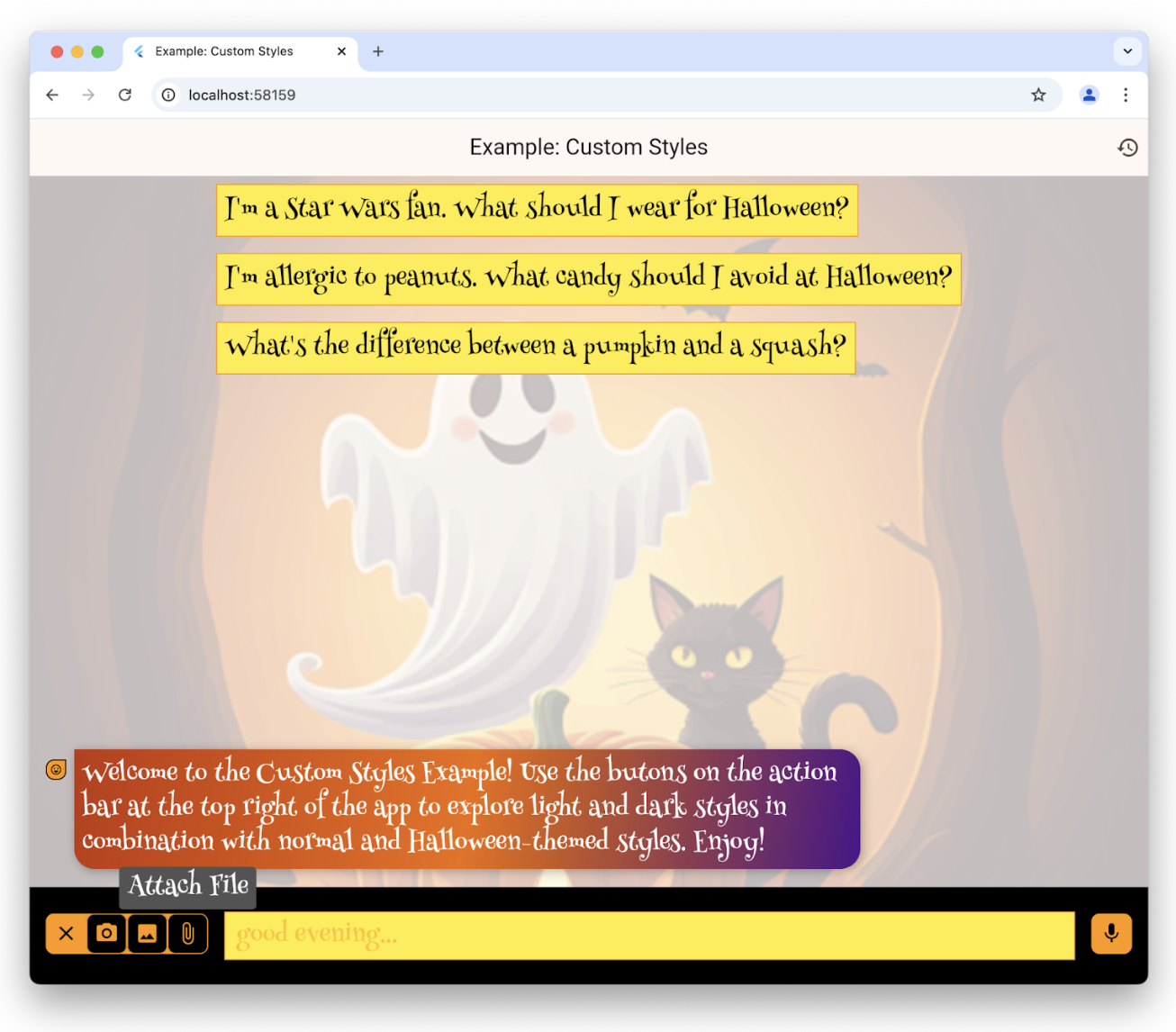
有關 LlmChatViewStyle 類中可用樣式的完整列表,請檢視參考文件。要檢視自定義樣式的實際應用,除了自定義樣式示例外,請檢視暗模式示例和演示應用。
無 UI 聊天
#您不必使用聊天檢視來訪問底層提供程式的功能。除了能夠簡單地呼叫其提供的任何專有介面之外,您還可以將其與 LlmProvider 介面一起使用。
例如,食譜示例應用在編輯食譜頁面上提供了一個魔術按鈕。該按鈕的目的是使用您當前的食物偏好更新資料庫中現有的食譜。按下按鈕可以預覽推薦的更改並決定是否應用它們
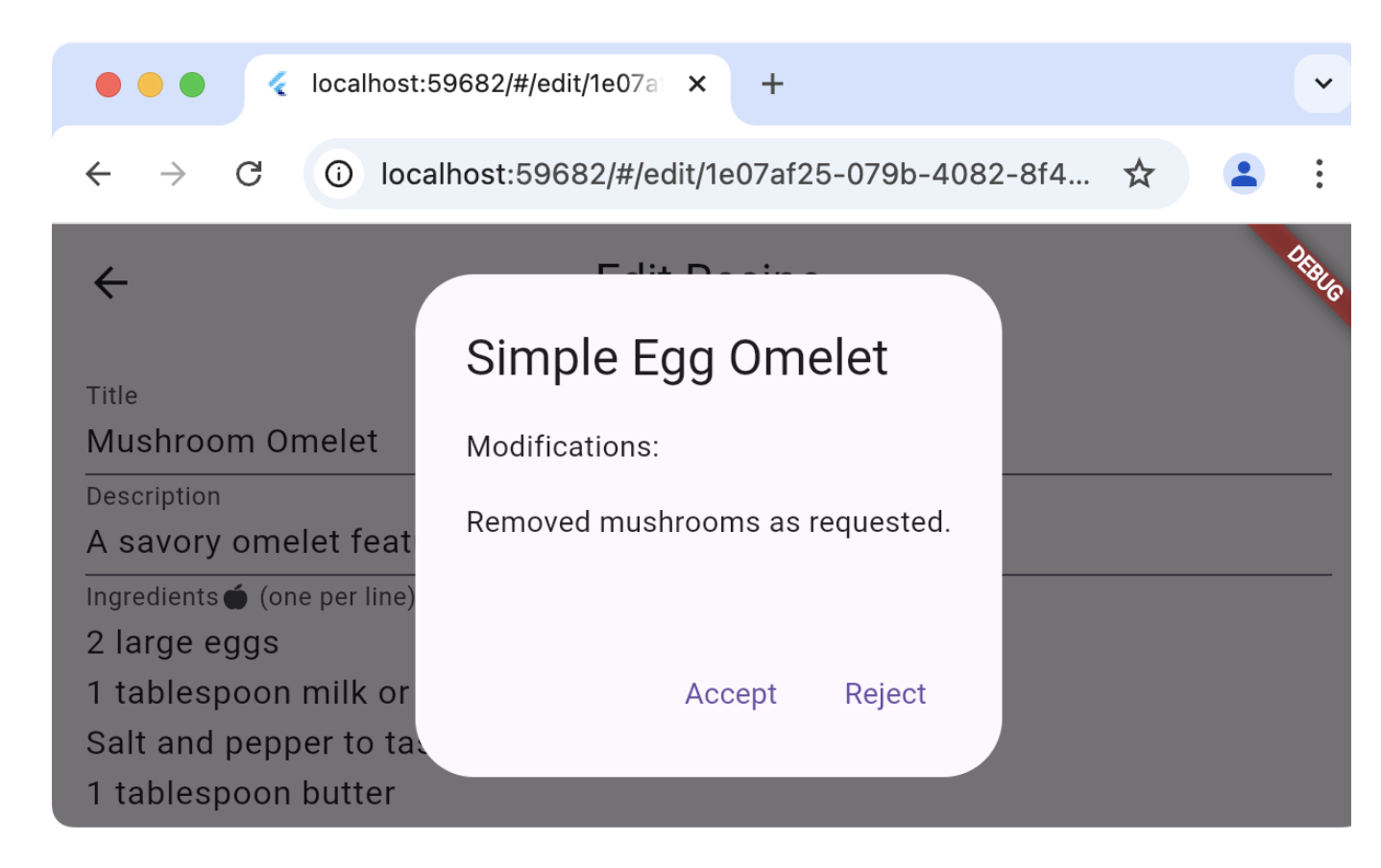
編輯食譜頁面不是使用應用聊天部分使用的相同提供程式(這會將虛假的使用者訊息和 LLM 響應插入到使用者的聊天曆史記錄中),而是建立自己的提供程式並直接使用它
class _EditRecipePageState extends State<EditRecipePage> {
  ...
  final _provider = GeminiProvider(...);
  ...
  Future<void> _onMagic() async {
    final stream = _provider.sendMessageStream(
      'Generate a modified version of this recipe based on my food preferences: '
      '${_ingredientsController.text}\n\n${_instructionsController.text}',
    );
    var response = await stream.join();
    final json = jsonDecode(response);

    try {
      final modifications = json['modifications'];
      final recipe = Recipe.fromJson(json['recipe']);

      if (!context.mounted) return;
      final accept = await showDialog<bool>(
        context: context,
        builder: (context) => AlertDialog(
          title: Text(recipe.title),
          content: Column(
            crossAxisAlignment: CrossAxisAlignment.start,
            children: [
              const Text('Modifications:'),
              const Gap(16),
              Text(_wrapText(modifications)),
            ],
          ),
          actions: [
            TextButton(
              onPressed: () => context.pop(true),
              child: const Text('Accept'),
            ),
            TextButton(
              onPressed: () => context.pop(false),
              child: const Text('Reject'),
            ),
          ],
        ),
      );
      ...
    } catch (ex) {
      ...
      }
    }
  }
}
對 sendMessageStream 的呼叫會在提供程式的歷史記錄中建立條目,但由於它與聊天檢視沒有關聯,因此不會顯示。如果方便,您也可以透過呼叫 generateStream 來完成相同的操作,這允許您重用現有提供程式而不影響聊天曆史記錄。
要檢視實際應用,請檢視食譜示例的編輯食譜頁面。
重新路由提示
#如果您想除錯、記錄或操作聊天檢視與底層提供程式之間的連線,您可以使用 LlmStreamGenerator 函式的實現來完成。然後將該函式傳遞給 LlmChatView 的 messageSender 引數
class ChatPage extends StatelessWidget {
  final _provider = GeminiProvider(...);

  @override
  Widget build(BuildContext context) => Scaffold(
      appBar: AppBar(title: const Text(App.title)),
      body: LlmChatView(
        provider: _provider,
        messageSender: _logMessage,
      ),
    );

  Stream<String> _logMessage(
    String prompt, {
    required Iterable<Attachment> attachments,
  }) async* {
    // log the message and attachments
    debugPrint('# Sending Message');
    debugPrint('## Prompt\n$prompt');
    debugPrint('## Attachments\n${attachments.map((a) => a.toString())}');

    // forward the message on to the provider
    final response = _provider.sendMessageStream(
      prompt,
      attachments: attachments,
    );

    // log the response
    final text = await response.join();
    debugPrint('## Response\n$text');

    // return it
    yield text;
  }
}
此示例記錄使用者提示和 LLM 響應的來回互動。當提供函式作為 messageSender 時,您有責任呼叫底層提供程式。如果您不呼叫,它將不會收到訊息。此功能允許您執行高階操作,例如動態路由到提供程式或檢索增強生成 (RAG)。
要檢視實際應用,請檢視日誌示例應用。