Swift 包管理器(Swift Package Manager)外掛作者指南
Flutter 的 Swift 包管理器(Swift Package Manager)整合有許多優勢
- 提供對 Swift 包生態系統的訪問。Flutter 外掛可以使用不斷增長的 Swift 包生態系統!
- 簡化 Flutter 安裝。Swift Package Manager 已包含在 Xcode 中。未來,您將無需安裝 Ruby 和 CocoaPods 即可針對 iOS 或 macOS。
如何開啟 Swift 包管理器(Swift Package Manager)
#Flutter 的 Swift 包管理器(Swift Package Manager)支援預設關閉。要啟用它:
升級到最新的 Flutter SDK
shflutter upgrade開啟 Swift 包管理器(Swift Package Manager)功能
shflutter config --enable-swift-package-manager
使用 Flutter CLI 執行應用會遷移專案以新增 Swift Package Manager 整合。這將使您的專案能夠下載您的 Flutter 外掛所依賴的 Swift 包。啟用 Swift Package Manager 整合的應用需要 Flutter 版本 3.24 或更高版本。要使用舊版 Flutter,您需要從應用中移除 Swift Package Manager 整合。
對於尚不支援 Swift Package Manager 的依賴項,Flutter 會回退到使用 CocoaPods。
如何關閉 Swift 包管理器(Swift Package Manager)
#停用 Swift Package Manager 會導致 Flutter 為所有依賴項使用 CocoaPods。但是,Swift Package Manager 仍然與您的專案整合。要完全從專案中移除 Swift Package Manager 整合,請遵循如何移除 Swift Package Manager 整合的說明。
關閉單個專案的 Swift 包管理器(Swift Package Manager)
#在專案的 pubspec.yaml 檔案中,於 flutter 部分下新增 disable-swift-package-manager: true。
# The following section is specific to Flutter packages.
flutter:
  disable-swift-package-manager: true
這將為該專案的所有協作者關閉 Swift 包管理器(Swift Package Manager)。
全域性關閉所有專案的 Swift 包管理器(Swift Package Manager)
#執行以下命令
flutter config --no-enable-swift-package-manager這將為當前使用者關閉 Swift 包管理器(Swift Package Manager)。
如果某個專案與 Swift 包管理器(Swift Package Manager)不相容,所有協作者都需要執行此命令。
如何為現有 Flutter 外掛新增 Swift 包管理器(Swift Package Manager)支援
#本指南展示瞭如何為已支援 CocoaPods 的外掛新增 Swift Package Manager 支援。這可以確保外掛可被所有 Flutter 專案使用。
在另行通知之前,Flutter 外掛應同時支援 Swift Package Manager 和 CocoaPods。
Swift Package Manager 的採用將是漸進式的。不支援 CocoaPods 的外掛將無法被尚未遷移到 Swift Package Manager 的專案使用。不支援 Swift Package Manager 的外掛可能會給已遷移的專案帶來問題。
在本指南中,將 plugin_name 替換為您的外掛名稱。以下示例使用了 ios,請根據適用情況將 ios 替換為 macos/darwin。
首先,在
ios、macos和/或darwin目錄下的子目錄中建立一個新目錄。將此新目錄命名為平臺包的名稱。plugin_name/ios/ ├── ... └── plugin_name/
在此新目錄中,建立以下檔案/目錄
Package.swift(檔案)Sources(目錄)Sources/plugin_name(目錄)
您的外掛應如下所示
plugin_name/ios/ ├── ... └── plugin_name/ ├── Package.swift └── Sources/plugin_name/
在
Package.swift檔案中使用以下模板Package.swiftswift// swift-tools-version: 5.9 // The swift-tools-version declares the minimum version of Swift required to build this package. import PackageDescription let package = Package( // TODO: Update your plugin name. name: "plugin_name", platforms: [ // TODO: Update the platforms your plugin supports. // If your plugin only supports iOS, remove `.macOS(...)`. // If your plugin only supports macOS, remove `.iOS(...)`. .iOS("13.0"), .macOS("10.15") ], products: [ // TODO: Update your library and target names. // If the plugin name contains "_", replace with "-" for the library name. .library(name: "plugin-name", targets: ["plugin_name"]) ], dependencies: [], targets: [ .target( // TODO: Update your target name. name: "plugin_name", dependencies: [], resources: [ // TODO: If your plugin requires a privacy manifest // (e.g. if it uses any required reason APIs), update the PrivacyInfo.xcprivacy file // to describe your plugin's privacy impact, and then uncomment this line. // For more information, see: // https://developer.apple.com/documentation/bundleresources/privacy_manifest_files // .process("PrivacyInfo.xcprivacy"), // TODO: If you have other resources that need to be bundled with your plugin, refer to // the following instructions to add them: // https://developer.apple.com/documentation/xcode/bundling-resources-with-a-swift-package ] ) ] )更新
Package.swift檔案中的支援的平臺。Package.swiftswiftplatforms: [ // TODO: Update the platforms your plugin supports. // If your plugin only supports iOS, remove `.macOS(...)`. // If your plugin only supports macOS, remove `.iOS(...)`. .iOS("13.0"), .macOS("10.15") ],更新
Package.swift檔案中的包、庫和目標名稱。Package.swiftswiftlet package = Package( // TODO: Update your plugin name. name: "plugin_name", platforms: [ .iOS("13.0"), .macOS("10.15") ], products: [ // TODO: Update your library and target names. // If the plugin name contains "_", replace with "-" for the library name .library(name: "plugin-name", targets: ["plugin_name"]) ], dependencies: [], targets: [ .target( // TODO: Update your target name. name: "plugin_name", dependencies: [], resources: [ // TODO: If your plugin requires a privacy manifest // (e.g. if it uses any required reason APIs), update the PrivacyInfo.xcprivacy file // to describe your plugin's privacy impact, and then uncomment this line. // For more information, see: // https://developer.apple.com/documentation/bundleresources/privacy_manifest_files // .process("PrivacyInfo.xcprivacy"), // TODO: If you have other resources that need to be bundled with your plugin, refer to // the following instructions to add them: // https://developer.apple.com/documentation/xcode/bundling-resources-with-a-swift-package ] ) ] )如果您的外掛有一個
PrivacyInfo.xcprivacy檔案,請將其移至ios/plugin_name/Sources/plugin_name/PrivacyInfo.xcprivacy並取消註釋Package.swift檔案中的相應資源。Package.swiftswiftresources: [ // TODO: If your plugin requires a privacy manifest // (e.g. if it uses any required reason APIs), update the PrivacyInfo.xcprivacy file // to describe your plugin's privacy impact, and then uncomment this line. // For more information, see: // https://developer.apple.com/documentation/bundleresources/privacy_manifest_files .process("PrivacyInfo.xcprivacy"), // TODO: If you have other resources that need to be bundled with your plugin, refer to // the following instructions to add them: // https://developer.apple.com/documentation/xcode/bundling-resources-with-a-swift-package ],將任何資原始檔從
ios/Assets移至ios/plugin_name/Sources/plugin_name(或子目錄)。如果適用,請將資原始檔新增到Package.swift檔案中。有關更多說明,請參閱https://developer.apple.com/documentation/xcode/bundling-resources-with-a-swift-package。將所有檔案從
ios/Classes移至ios/plugin_name/Sources/plugin_name。ios/Assets、ios/Resources和ios/Classes目錄現在應該為空,可以刪除。如果您的外掛使用了 Pigeon,請更新您的 Pigeon 輸入檔案。
pigeons/messages.dartdartkotlinOptions: KotlinOptions(), javaOut: 'android/app/src/main/java/io/flutter/plugins/Messages.java', javaOptions: JavaOptions(), swiftOut: 'ios/Classes/messages.g.swift', swiftOut: 'ios/plugin_name/Sources/plugin_name/messages.g.swift', swiftOptions: SwiftOptions(),使用任何您可能需要的自定義項更新您的
Package.swift檔案。在 Xcode 中開啟
ios/plugin_name/目錄。在 Xcode 中,開啟您的
Package.swift檔案。驗證 Xcode 在此檔案上是否沒有產生任何警告或錯誤。如果您的
ios/plugin_name.podspec檔案有 CocoaPodsdependency,請在您的Package.swift檔案中新增相應的 Swift Package Manager 依賴項。如果您的包必須顯式連結
static或dynamic(Apple 不推薦),請更新 Product 以定義型別。Package.swiftswiftproducts: [ .library(name: "plugin-name", type: .static, targets: ["plugin_name"]) ],進行任何其他自定義。有關如何編寫
Package.swift檔案的更多資訊,請參閱https://developer.apple.com/documentation/packagedescription。
更新您的
ios/plugin_name.podspec檔案以指向新路徑。ios/plugin_name.podspecrubys.source_files = 'Classes/**/*.swift' s.resource_bundles = {'plugin_name_privacy' => ['Resources/PrivacyInfo.xcprivacy']} s.source_files = 'plugin_name/Sources/plugin_name/**/*.swift' s.resource_bundles = {'plugin_name_privacy' => ['plugin_name/Sources/plugin_name/PrivacyInfo.xcprivacy']}更新從 bundle 載入資源的方式,使用
Bundle.module。swift#if SWIFT_PACKAGE let settingsURL = Bundle.module.url(forResource: "image", withExtension: "jpg") #else let settingsURL = Bundle(for: Self.self).url(forResource: "image", withExtension: "jpg") #endif如果您的
.gitignore檔案未包含.build/和.swiftpm/目錄,則應更新您的.gitignore檔案以包含:.gitignoretext.build/ .swiftpm/將您的外掛更改提交到版本控制系統。
驗證外掛是否仍與 CocoaPods 相容。
關閉 Swift 包管理器(Swift Package Manager)。
shflutter config --no-enable-swift-package-manager導航到外掛的示例應用。
shcd path/to/plugin/example/確保外掛的示例應用能夠構建並執行。
shflutter run導航到外掛的頂級目錄。
shcd path/to/plugin/執行 CocoaPods 驗證 lint。
shpod lib lint ios/plugin_name.podspec --configuration=Debug --skip-tests --use-modular-headers --use-librariesshpod lib lint ios/plugin_name.podspec --configuration=Debug --skip-tests --use-modular-headers
驗證外掛是否與 Swift 包管理器(Swift Package Manager)相容。
開啟 Swift 包管理器(Swift Package Manager)。
shflutter config --enable-swift-package-manager導航到外掛的示例應用。
shcd path/to/plugin/example/確保外掛的示例應用能夠構建並執行。
shflutter run在 Xcode 中開啟外掛的示例應用。確保在左側的 Project Navigator 中顯示 Package Dependencies。
驗證測試是否透過。
如果您的外掛有原生單元測試(XCTest),請確保您也更新外掛示例應用中的單元測試。
遵循測試外掛的說明。
在本指南中,將 plugin_name 替換為您的外掛名稱。以下示例使用了 ios,請根據適用情況將 ios 替換為 macos/darwin。
首先,在
ios、macos和/或darwin目錄下的子目錄中建立一個新目錄。將此新目錄命名為平臺包的名稱。plugin_name/ios/ ├── ... └── plugin_name/
在此新目錄中,建立以下檔案/目錄
Package.swift(檔案)Sources(目錄)Sources/plugin_name(目錄)Sources/plugin_name/include(目錄)Sources/plugin_name/include/plugin_name(目錄)Sources/plugin_name/include/plugin_name/.gitkeep(檔案)- 此檔案確保目錄被提交。如果目錄中添加了其他檔案,您可以刪除
.gitkeep檔案。
- 此檔案確保目錄被提交。如果目錄中添加了其他檔案,您可以刪除
您的外掛應如下所示
plugin_name/ios/ ├── ... └── plugin_name/ ├── Package.swift └── Sources/plugin_name/include/plugin_name/ └── .gitkeep在
Package.swift檔案中使用以下模板Package.swiftswift// swift-tools-version: 5.9 // The swift-tools-version declares the minimum version of Swift required to build this package. import PackageDescription let package = Package( // TODO: Update your plugin name. name: "plugin_name", platforms: [ // TODO: Update the platforms your plugin supports. // If your plugin only supports iOS, remove `.macOS(...)`. // If your plugin only supports macOS, remove `.iOS(...)`. .iOS("13.0"), .macOS("10.15") ], products: [ // TODO: Update your library and target names. // If the plugin name contains "_", replace with "-" for the library name .library(name: "plugin-name", targets: ["plugin_name"]) ], dependencies: [], targets: [ .target( // TODO: Update your target name. name: "plugin_name", dependencies: [], resources: [ // TODO: If your plugin requires a privacy manifest // (e.g. if it uses any required reason APIs), update the PrivacyInfo.xcprivacy file // to describe your plugin's privacy impact, and then uncomment this line. // For more information, see: // https://developer.apple.com/documentation/bundleresources/privacy_manifest_files // .process("PrivacyInfo.xcprivacy"), // TODO: If you have other resources that need to be bundled with your plugin, refer to // the following instructions to add them: // https://developer.apple.com/documentation/xcode/bundling-resources-with-a-swift-package ], cSettings: [ // TODO: Update your plugin name. .headerSearchPath("include/plugin_name") ] ) ] )更新
Package.swift檔案中的支援的平臺。Package.swiftswiftplatforms: [ // TODO: Update the platforms your plugin supports. // If your plugin only supports iOS, remove `.macOS(...)`. // If your plugin only supports macOS, remove `.iOS(...)`. .iOS("13.0"), .macOS("10.15") ],更新
Package.swift檔案中的包、庫和目標名稱。Package.swiftswiftlet package = Package( // TODO: Update your plugin name. name: "plugin_name", platforms: [ .iOS("13.0"), .macOS("10.15") ], products: [ // TODO: Update your library and target names. // If the plugin name contains "_", replace with "-" for the library name .library(name: "plugin-name", targets: ["plugin_name"]) ], dependencies: [], targets: [ .target( // TODO: Update your target name. name: "plugin_name", dependencies: [], resources: [ // TODO: If your plugin requires a privacy manifest // (e.g. if it uses any required reason APIs), update the PrivacyInfo.xcprivacy file // to describe your plugin's privacy impact, and then uncomment this line. // For more information, see: // https://developer.apple.com/documentation/bundleresources/privacy_manifest_files // .process("PrivacyInfo.xcprivacy"), // TODO: If you have other resources that need to be bundled with your plugin, refer to // the following instructions to add them: // https://developer.apple.com/documentation/xcode/bundling-resources-with-a-swift-package ], cSettings: [ // TODO: Update your plugin name. .headerSearchPath("include/plugin_name") ] ) ] )如果您的外掛有一個
PrivacyInfo.xcprivacy檔案,請將其移至ios/plugin_name/Sources/plugin_name/PrivacyInfo.xcprivacy並取消註釋Package.swift檔案中的相應資源。Package.swiftswiftresources: [ // TODO: If your plugin requires a privacy manifest // (e.g. if it uses any required reason APIs), update the PrivacyInfo.xcprivacy file // to describe your plugin's privacy impact, and then uncomment this line. // For more information, see: // https://developer.apple.com/documentation/bundleresources/privacy_manifest_files .process("PrivacyInfo.xcprivacy"), // TODO: If you have other resources that need to be bundled with your plugin, refer to // the following instructions to add them: // https://developer.apple.com/documentation/xcode/bundling-resources-with-a-swift-package ],將任何資原始檔從
ios/Assets移至ios/plugin_name/Sources/plugin_name(或子目錄)。如果適用,請將資原始檔新增到Package.swift檔案中。有關更多說明,請參閱https://developer.apple.com/documentation/xcode/bundling-resources-with-a-swift-package。將任何公共標頭檔案從
ios/Classes移至ios/plugin_name/Sources/plugin_name/include/plugin_name。如果您不確定哪些標頭檔案是公共的,請檢查您的
podspec檔案中的public_header_files屬性。如果未指定此屬性,則所有標頭檔案都是公共的。您應該考慮是否希望所有標頭檔案都公開。在
pubspec.yaml檔案中定義的pluginClass必須是公共的,並且在此目錄內。
處理
modulemap。如果您的外掛沒有
modulemap,請跳過此步驟。如果您正在使用
modulemap來讓 CocoaPods 建立一個 Test 子模組,請考慮為 Swift Package Manager 移除它。請注意,這將使所有公共標頭檔案都可以透過模組訪問。要為 Swift Package Manager 移除
modulemap但保留給 CocoaPods,請在外掛的Package.swift檔案中排除modulemap和 umbrella 標頭檔案。以下示例假定
modulemap和 umbrella 標頭檔案位於ios/plugin_name/Sources/plugin_name/include目錄中。Package.swiftswift.target( name: "plugin_name", dependencies: [], exclude: ["include/cocoapods_plugin_name.modulemap", "include/plugin_name-umbrella.h"],如果您希望將單元測試同時相容 CocoaPods 和 Swift Package Manager,可以嘗試以下方法:
Tests/TestFile.mobjc@import plugin_name; @import plugin_name.Test; #if __has_include(<plugin_name plugin_name-umbrella.h="">) @import plugin_name.Test; #endif如果您想為 Swift 包使用自定義
modulemap,請參閱Swift Package Manager 的文件。將
ios/Classes中的所有剩餘檔案移至ios/plugin_name/Sources/plugin_name。ios/Assets、ios/Resources和ios/Classes目錄現在應該為空,可以刪除。如果您的標頭檔案不再與實現檔案在同一目錄中,您應該更新您的 import 語句。
例如,假設有以下遷移:
之前
     ios/Classes/
├── PublicHeaderFile.h
└── ImplementationFile.m
之後
     ios/plugin_name/Sources/plugin_name/
└── include/plugin_name/
   └── PublicHeaderFile.h
└── ImplementationFile.m
在此示例中,
ImplementationFile.m中的 import 語句應更新為:Sources/plugin_name/ImplementationFile.mobjc#import "PublicHeaderFile.h" #import "./include/plugin_name/PublicHeaderFile.h"如果您的外掛使用了 Pigeon,請更新您的 Pigeon 輸入檔案。
pigeons/messages.dartdartjavaOptions: JavaOptions(), objcHeaderOut: 'ios/Classes/messages.g.h', objcSourceOut: 'ios/Classes/messages.g.m', objcHeaderOut: 'ios/plugin_name/Sources/plugin_name/messages.g.h', objcSourceOut: 'ios/plugin_name/Sources/plugin_name/messages.g.m', copyrightHeader: 'pigeons/copyright.txt',如果您的
objcHeaderOut檔案不再與objcSourceOut在同一目錄中,您可以使用ObjcOptions.headerIncludePath來更改#import。pigeons/messages.dartdartjavaOptions: JavaOptions(), objcHeaderOut: 'ios/Classes/messages.g.h', objcSourceOut: 'ios/Classes/messages.g.m', objcHeaderOut: 'ios/plugin_name/Sources/plugin_name/include/plugin_name/messages.g.h', objcSourceOut: 'ios/plugin_name/Sources/plugin_name/messages.g.m', objcOptions: ObjcOptions( headerIncludePath: './include/plugin_name/messages.g.h', ), copyrightHeader: 'pigeons/copyright.txt',執行 Pigeon 以使用最新配置重新生成程式碼。
使用任何您可能需要的自定義項更新您的
Package.swift檔案。在 Xcode 中開啟
ios/plugin_name/目錄。在 Xcode 中,開啟您的
Package.swift檔案。驗證 Xcode 在此檔案上是否沒有產生任何警告或錯誤。如果您的
ios/plugin_name.podspec檔案有 CocoaPodsdependency,請在您的Package.swift檔案中新增相應的 Swift Package Manager 依賴項。如果您的包必須顯式連結
static或dynamic(Apple 不推薦),請更新 Product 以定義型別。Package.swiftswiftproducts: [ .library(name: "plugin-name", type: .static, targets: ["plugin_name"]) ],進行任何其他自定義。有關如何編寫
Package.swift檔案的更多資訊,請參閱https://developer.apple.com/documentation/packagedescription。
更新您的
ios/plugin_name.podspec檔案以指向新路徑。ios/plugin_name.podspecrubys.source_files = 'Classes/**/*.{h,m}' s.public_header_files = 'Classes/**/*.h' s.module_map = 'Classes/cocoapods_plugin_name.modulemap' s.resource_bundles = {'plugin_name_privacy' => ['Resources/PrivacyInfo.xcprivacy']} s.source_files = 'plugin_name/Sources/plugin_name/**/*.{h,m}' s.public_header_files = 'plugin_name/Sources/plugin_name/include/**/*.h' s.module_map = 'plugin_name/Sources/plugin_name/include/cocoapods_plugin_name.modulemap' s.resource_bundles = {'plugin_name_privacy' => ['plugin_name/Sources/plugin_name/PrivacyInfo.xcprivacy']}更新從 bundle 載入資源的方式,使用
SWIFTPM_MODULE_BUNDLE。objc#if SWIFT_PACKAGE NSBundle *bundle = SWIFTPM_MODULE_BUNDLE; #else NSBundle *bundle = [NSBundle bundleForClass:[self class]]; #endif NSURL *imageURL = [bundle URLForResource:@"image" withExtension:@"jpg"];如果您的
ios/plugin_name/Sources/plugin_name/include目錄僅包含一個.gitkeep,您應該更新您的.gitignore檔案以包含以下內容:.gitignoretext!.gitkeep執行
flutter pub publish --dry-run以確保include目錄被髮布。將您的外掛更改提交到版本控制系統。
驗證外掛是否仍與 CocoaPods 相容。
關閉 Swift 包管理器(Swift Package Manager)。
shflutter config --no-enable-swift-package-manager導航到外掛的示例應用。
shcd path/to/plugin/example/確保外掛的示例應用能夠構建並執行。
shflutter run導航到外掛的頂級目錄。
shcd path/to/plugin/執行 CocoaPods 驗證 lint。
shpod lib lint ios/plugin_name.podspec --configuration=Debug --skip-tests --use-modular-headers --use-librariesshpod lib lint ios/plugin_name.podspec --configuration=Debug --skip-tests --use-modular-headers
驗證外掛是否與 Swift 包管理器(Swift Package Manager)相容。
開啟 Swift 包管理器(Swift Package Manager)。
shflutter config --enable-swift-package-manager導航到外掛的示例應用。
shcd path/to/plugin/example/確保外掛的示例應用能夠構建並執行。
shflutter run在 Xcode 中開啟外掛的示例應用。確保在左側的 Project Navigator 中顯示 Package Dependencies。
驗證測試是否透過。
如果您的外掛有原生單元測試(XCTest),請確保您也更新外掛示例應用中的單元測試。
遵循測試外掛的說明。
</plugin_name>
如何更新外掛示例應用中的單元測試
#如果您的外掛具有原生的 XCTests,您可能需要更新它們以適應 Swift Package Manager,如果以下任一情況為真:
- 您正在為測試使用 CocoaPod 依賴項。
- 您的外掛在
Package.swift檔案中明確設定為type: .dynamic。
更新您的單元測試:
在 Xcode 中開啟您的
example/ios/Runner.xcworkspace。如果您曾為測試使用 CocoaPod 依賴項(如
OCMock),請將其從您的Podfile檔案中移除。ios/Podfilerubytarget 'RunnerTests' do inherit! :search_paths pod 'OCMock', '3.5' end然後在終端中,在
plugin_name_ios/example/ios目錄執行pod install。導航到專案的 Package Dependencies。
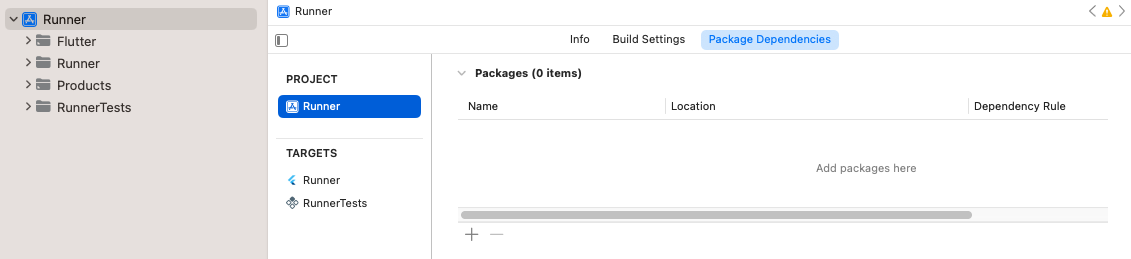
專案的包依賴項 點選 + 按鈕,透過在右上角的搜尋欄中搜索來新增任何僅用於測試的依賴項。
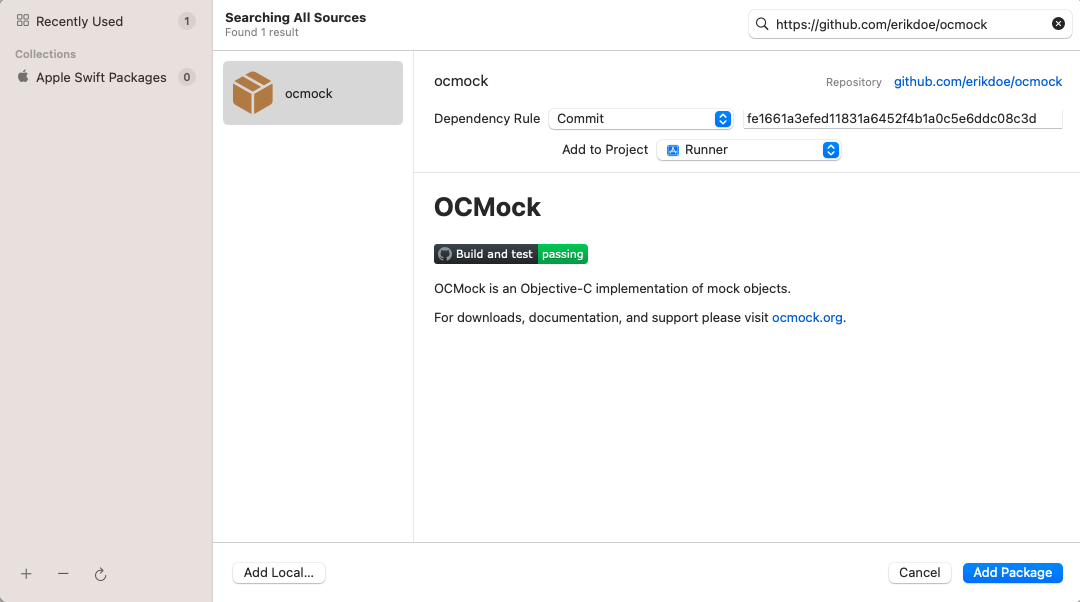
搜尋僅用於測試的依賴項 確保依賴項已新增到
RunnerTestsTarget。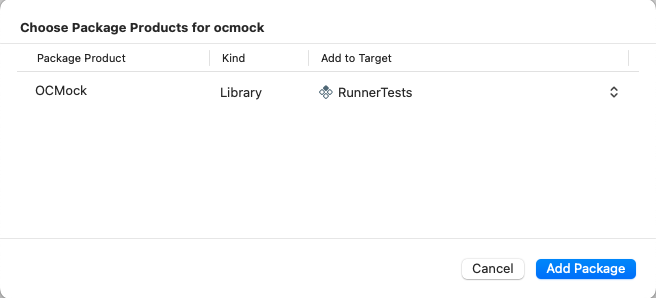
確保依賴項已新增到 RunnerTests目標點選 Add Package 按鈕。
如果您已在
Package.swift檔案中將外掛的庫型別顯式設定為.dynamic(Apple 不推薦),您還需要將其新增為RunnerTests目標的依賴項。確保
RunnerTests的 Build Phases 中有一個 Link Binary With Libraries 構建階段。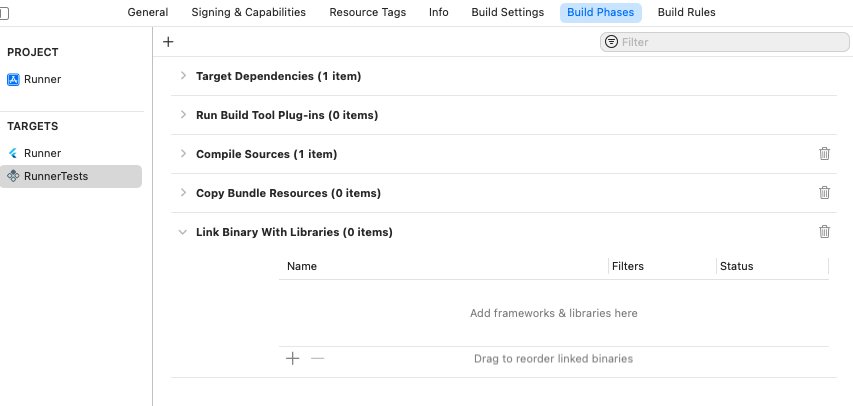
RunnerTests目標中的Link Binary With Libraries構建階段如果構建階段尚不存在,請建立一個。點選 add,然後點選 New Link Binary With Libraries Phase。
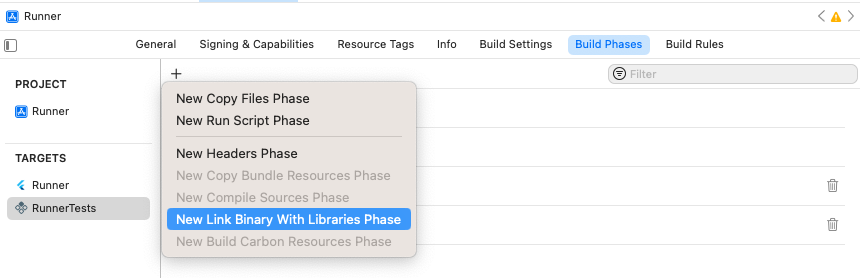
新增 Link Binary With Libraries構建階段導航到專案的 Package Dependencies。
點選 add。
在開啟的對話方塊中,點選 Add Local... 按鈕。
導航到
plugin_name/plugin_name_ios/ios/plugin_name_ios並點選 Add Package 按鈕。確保它已新增到
RunnerTests目標,然後點選 Add Package 按鈕。
確保測試透過 Product > Test。