樂觀狀態
在構建使用者體驗時,效能的感知度有時與程式碼的實際效能同等重要。總的來說,使用者不喜歡等待操作完成才能看到結果,從使用者的角度來看,任何需要幾毫秒以上才能完成的操作都可能被視為“慢”或“無響應”。
開發者可以透過在後臺任務完全完成之前顯示成功的 UI 狀態來緩解這種負面感知。一個例子是點選“訂閱”按鈕,立即看到它變為“已訂閱”,即使後臺對訂閱 API 的呼叫仍在進行中。
這種技術被稱為樂觀狀態、樂觀 UI 或樂觀使用者體驗。在本食譜中,您將使用樂觀狀態並遵循 Flutter 架構指南 來實現一個應用程式功能。
示例功能:訂閱按鈕
#此示例實現了一個訂閱按鈕,類似於您在影片流應用程式或新聞通訊中可能找到的按鈕。
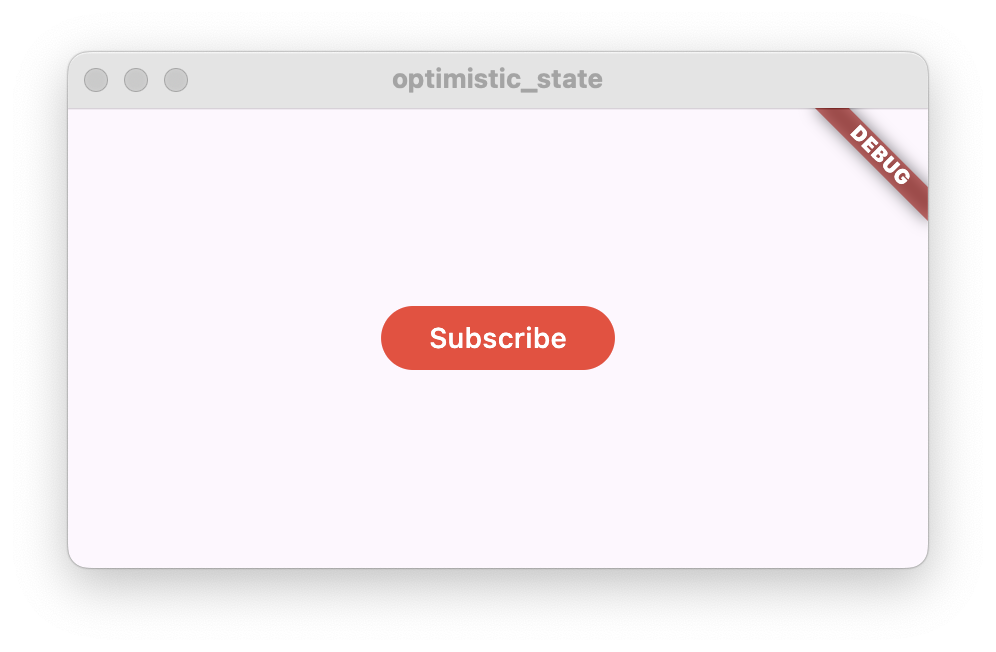
當按鈕被點選時,應用程式會呼叫外部 API,執行訂閱操作,例如在資料庫中記錄使用者已在訂閱列表中。為了演示目的,您將不實現實際的後端程式碼,而是用一個模擬網路請求的假操作來替換此呼叫。
如果呼叫成功,按鈕文字將從“訂閱”更改為“已訂閱”。按鈕的背景顏色也將隨之改變。
相反,如果呼叫失敗,按鈕文字應恢復為“訂閱”,並且 UI 應向用戶顯示錯誤訊息,例如使用 Snackbar。

遵循樂觀狀態的理念,按鈕一旦被點選,應立即變為“已訂閱”,只有在請求失敗時才變回“訂閱”。
功能架構
#首先定義功能架構。按照架構指南,在 Flutter 專案中建立以下 Dart 類:
- 一個名為
SubscribeButton的StatefulWidget - 一個名為
SubscribeButtonViewModel並繼承自ChangeNotifier的類 - 一個名為
SubscriptionRepository的類
class SubscribeButton extends StatefulWidget {
  const SubscribeButton({super.key});

  @override
  State<SubscribeButton> createState() => _SubscribeButtonState();
}

class _SubscribeButtonState extends State<SubscribeButton> {
  @override
  Widget build(BuildContext context) {
    return const Placeholder();
  }
}

class SubscribeButtonViewModel extends ChangeNotifier {}

class SubscriptionRepository {}
SubscribeButton widget 和 SubscribeButtonViewModel 代表了此解決方案的表示層。widget 將顯示一個按鈕,該按鈕根據訂閱狀態顯示“訂閱”或“已訂閱”文字。檢視模型將包含訂閱狀態。當按鈕被點選時,widget 將呼叫檢視模型來執行操作。
SubscriptionRepository 將實現一個 subscribe 方法,該方法在操作失敗時會丟擲異常。檢視模型在執行訂閱操作時將呼叫此方法。
接下來,透過將 SubscriptionRepository 新增到 SubscribeButtonViewModel 中將它們連線起來。
class SubscribeButtonViewModel extends ChangeNotifier {
  SubscribeButtonViewModel({required this.subscriptionRepository});

  final SubscriptionRepository subscriptionRepository;
}
並將 SubscribeButtonViewModel 新增到 SubscribeButton widget 中。
class SubscribeButton extends StatefulWidget {
  const SubscribeButton({super.key, required this.viewModel});

  /// Subscribe button view model.
  final SubscribeButtonViewModel viewModel;

  @override
  State<SubscribeButton> createState() => _SubscribeButtonState();
}
現在您已經建立了基本解決方案架構,可以按如下方式建立 SubscribeButton widget:
SubscribeButton(
  viewModel: SubscribeButtonViewModel(
    subscriptionRepository: SubscriptionRepository(),
  ),
)
實現 SubscriptionRepository
#向 SubscriptionRepository 新增一個名為 subscribe() 的新非同步方法,幷包含以下程式碼:
class SubscriptionRepository {
  /// Simulates a network request and then fails.
  Future<void> subscribe() async {
    // Simulate a network request
    await Future.delayed(const Duration(seconds: 1));
    // Fail after one second
    throw Exception('Failed to subscribe');
  }
}
添加了對 await Future.delayed() 的呼叫,持續一秒鐘,以模擬一個耗時的請求。方法執行將暫停一秒鐘,然後繼續執行。
為了模擬請求失敗,subscribe 方法最後丟擲一個異常。稍後將使用此異常來演示在實現樂觀狀態時如何從失敗的請求中恢復。
實現 SubscribeButtonViewModel
#為了表示訂閱狀態以及可能的錯誤狀態,請向 SubscribeButtonViewModel 新增以下公共成員:
// Whether the user is subscribed
bool subscribed = false;

// Whether the subscription action has failed
bool error = false;
兩者在開始時都設定為 false。
遵循樂觀狀態的理念,一旦使用者點選訂閱按鈕,subscribed 狀態將變為 true。只有在操作失敗時才會變回 false。
當操作失敗時,error 狀態將變為 true,指示 SubscribeButton widget 向用戶顯示錯誤訊息。變數應該在錯誤顯示後恢復為 false。
接下來,實現一個非同步 subscribe() 方法。
// Subscription action
Future<void> subscribe() async {
  // Ignore taps when subscribed
  if (subscribed) {
    return;
  }

  // Optimistic state.
  // It will be reverted if the subscription fails.
  subscribed = true;
  // Notify listeners to update the UI
  notifyListeners();

  try {
    await subscriptionRepository.subscribe();
  } catch (e) {
    print('Failed to subscribe: $e');
    // Revert to the previous state
    subscribed = false;
    // Set the error state
    error = true;
  } finally {
    notifyListeners();
  }
}
如前所述,首先將 subscribed 狀態設定為 true,然後呼叫 notifyListeners()。這將強制 UI 更新,按鈕會改變外觀,向用戶顯示“已訂閱”文字。
然後,方法執行對 repository 的實際呼叫。此呼叫被 try-catch 包裹,以便捕獲它可能丟擲的任何異常。如果捕獲到異常,則將 subscribed 狀態重置為 false,並將 error 狀態設定為 true。最後呼叫 notifyListeners() 將 UI 變回“訂閱”。
如果沒有異常,則過程完成,因為 UI 已經反映了成功狀態。
完整的 SubscribeButtonViewModel 應如下所示:
/// Subscribe button View Model.
/// Handles the subscribe action and exposes the state to the subscription.
class SubscribeButtonViewModel extends ChangeNotifier {
  SubscribeButtonViewModel({required this.subscriptionRepository});

  final SubscriptionRepository subscriptionRepository;

  // Whether the user is subscribed
  bool subscribed = false;

  // Whether the subscription action has failed
  bool error = false;

  // Subscription action
  Future<void> subscribe() async {
    // Ignore taps when subscribed
    if (subscribed) {
      return;
    }

    // Optimistic state.
    // It will be reverted if the subscription fails.
    subscribed = true;
    // Notify listeners to update the UI
    notifyListeners();

    try {
      await subscriptionRepository.subscribe();
    } catch (e) {
      print('Failed to subscribe: $e');
      // Revert to the previous state
      subscribed = false;
      // Set the error state
      error = true;
    } finally {
      notifyListeners();
    }
  }

}
實現 SubscribeButton
#在此步驟中,您將首先實現 SubscribeButton 的 build 方法,然後實現功能中的錯誤處理。
將以下程式碼新增到 build 方法中:
@override
Widget build(BuildContext context) {
  return ListenableBuilder(
    listenable: widget.viewModel,
    builder: (context, _) {
      return FilledButton(
        onPressed: widget.viewModel.subscribe,
        style: widget.viewModel.subscribed
            ? SubscribeButtonStyle.subscribed
            : SubscribeButtonStyle.unsubscribed,
        child: widget.viewModel.subscribed
            ? const Text('Subscribed')
            : const Text('Subscribe'),
      );
    },
  );
}
此 build 方法包含一個 ListenableBuilder,它監聽檢視模型的變化。然後,構建器建立一個 FilledButton,根據檢視模型狀態顯示“已訂閱”或“訂閱”文字。按鈕樣式也將根據此狀態而改變。此外,當按鈕被點選時,它會執行檢視模型中的 subscribe() 方法。
SubscribeButtonStyle 可以在此處找到。將此類新增到 SubscribeButton 旁邊。您可以隨意修改 ButtonStyle。
class SubscribeButtonStyle {
  static const unsubscribed = ButtonStyle(
    backgroundColor: WidgetStatePropertyAll(Colors.red),
  );

  static const subscribed = ButtonStyle(
    backgroundColor: WidgetStatePropertyAll(Colors.green),
  );
}
如果您現在執行應用程式,您將看到按鈕在按下時會發生變化,但它會恢復到原始狀態而不會顯示錯誤。
處理錯誤
#要處理錯誤,請將 initState() 和 dispose() 方法新增到 SubscribeButtonState,然後新增 _onViewModelChange() 方法。
@override
void initState() {
  super.initState();
  widget.viewModel.addListener(_onViewModelChange);
}

@override
void dispose() {
  widget.viewModel.removeListener(_onViewModelChange);
  super.dispose();
}/// Listen to ViewModel changes.
void _onViewModelChange() {
// If the subscription action has failed
if (widget.viewModel.error) {
// Reset the error state
widget.viewModel.error = false;
// Show an error message
ScaffoldMessenger.of(
context,
).showSnackBar(const SnackBar(content: Text('Failed to subscribe')));
}
}呼叫 addListener() 會註冊 _onViewModelChange() 方法,以便在檢視模型通知監聽器時被呼叫。在 widget 被處置時呼叫 removeListener() 很重要,以避免錯誤。
_onViewModelChange() 方法檢查 error 狀態,如果為 true,則向用戶顯示一個 Snackbar,其中包含錯誤訊息。同時,將 error 狀態重置為 false,以避免在檢視模型中再次呼叫 notifyListeners() 時多次顯示錯誤訊息。
高階樂觀狀態
#在此教程中,您學習瞭如何實現具有單一二進位制狀態的樂觀狀態,但您可以使用此技術透過引入第三個時間狀態來建立更高階的解決方案,該狀態指示操作仍在進行中。
例如,在聊天應用程式中,當用戶傳送新訊息時,應用程式將在聊天視窗中顯示新聊天訊息,但會有一個圖示指示訊息尚未送達。當訊息送達時,該圖示將被移除。
在訂閱按鈕示例中,您可以在檢視模型中新增另一個標誌,指示 subscribe() 方法仍在執行,或者使用 Command 模式的執行狀態,然後稍微修改按鈕樣式以顯示操作正在進行中。
互動示例
#此示例展示了 SubscribeButton widget 與 SubscribeButtonViewModel 和 SubscriptionRepository 一起,它們實現了帶有樂觀狀態的訂閱點選操作。
當您點選按鈕時,按鈕文字從“訂閱”變為“已訂閱”。一秒鐘後,repository 丟擲一個異常,該異常被檢視模型捕獲,按鈕恢復顯示“訂閱”,同時顯示一個帶有錯誤訊息的 Snackbar。
// ignore_for_file: avoid_print
import 'package:flutter/material.dart';
void main() {
runApp(const MyApp());
}
class MyApp extends StatelessWidget {
const MyApp({super.key});
// This widget is the root of your application.
@override
Widget build(BuildContext context) {
return MaterialApp(
home: Scaffold(
body: Center(
child: SubscribeButton(
viewModel: SubscribeButtonViewModel(
subscriptionRepository: SubscriptionRepository(),
),
),
),
),
);
}
}
/// A button that simulates a subscription action.
/// For example, subscribing to a newsletter or a streaming channel.
class SubscribeButton extends StatefulWidget {
const SubscribeButton({super.key, required this.viewModel});
/// Subscribe button view model.
final SubscribeButtonViewModel viewModel;
@override
State<SubscribeButton> createState() => _SubscribeButtonState();
}
class _SubscribeButtonState extends State<SubscribeButton> {
@override
void initState() {
super.initState();
widget.viewModel.addListener(_onViewModelChange);
}
@override
void dispose() {
widget.viewModel.removeListener(_onViewModelChange);
super.dispose();
}
@override
Widget build(BuildContext context) {
return ListenableBuilder(
listenable: widget.viewModel,
builder: (context, _) {
return FilledButton(
onPressed: widget.viewModel.subscribe,
style: widget.viewModel.subscribed
? SubscribeButtonStyle.subscribed
: SubscribeButtonStyle.unsubscribed,
child: widget.viewModel.subscribed
? const Text('Subscribed')
: const Text('Subscribe'),
);
},
);
}
/// Listen to ViewModel changes.
void _onViewModelChange() {
  // If the subscription action has failed
  if (widget.viewModel.error) {
    // Reset the error state
    widget.viewModel.error = false;
    // Show an error message
    ScaffoldMessenger.of(
      context,
    ).showSnackBar(const SnackBar(content: Text('Failed to subscribe')));
  }
}
}
class SubscribeButtonStyle {
static const unsubscribed = ButtonStyle(
backgroundColor: WidgetStatePropertyAll(Colors.red),
);
static const subscribed = ButtonStyle(
backgroundColor: WidgetStatePropertyAll(Colors.green),
);
}
/// Subscribe button View Model.
/// Handles the subscribe action and exposes the state to the subscription.
class SubscribeButtonViewModel extends ChangeNotifier {
SubscribeButtonViewModel({required this.subscriptionRepository});
final SubscriptionRepository subscriptionRepository;
// Whether the user is subscribed
bool subscribed = false;
// Whether the subscription action has failed
bool error = false;
// Subscription action
Future<void> subscribe() async {
// Ignore taps when subscribed
if (subscribed) {
return;
}
// Optimistic state.
// It will be reverted if the subscription fails.
subscribed = true;
// Notify listeners to update the UI
notifyListeners();
try {
await subscriptionRepository.subscribe();
} catch (e) {
print('Failed to subscribe: $e');
// Revert to the previous state
subscribed = false;
// Set the error state
error = true;
} finally {
notifyListeners();
}
}
}
/// Repository of subscriptions.
class SubscriptionRepository {
/// Simulates a network request and then fails.
Future<void> subscribe() async {
// Simulate a network request
await Future.delayed(const Duration(seconds: 1));
// Fail after one second
throw Exception('Failed to subscribe');
}
}