UISceneDelegate 採用
概述
#Apple 現在要求 iOS 開發人員採用 UISceneDelegate 協議,這會改變應用程式啟動時的初始化順序。如果您的 iOS 應用修改了 application:didFinishLaunchingWithOptions:,則可能需要更新。
背景
#大多數 Flutter 應用在 application:didFinishLaunchingWithOptions: 中不會有自定義邏輯。這些應用不需要進行任何程式碼遷移。在大多數情況下,Flutter 會自動遷移 Info.plist。
Apple 現在要求採用 UISceneDelegate,這會重新排序 iOS 應用的初始化。指定 UISceneDelegate 後,Storyboard 的初始化會被延遲到呼叫 application:didFinishLaunchingWithOptions: 之後。這意味著 UIApplicationDelegate.window 和 UIApplicationDelegate.window.rootViewController 無法從 application:didFinishLaunchingWithOptions: 訪問。
Apple 正在推動 UISceneDelegate API 的採用,因為它允許應用擁有多個 UI 例項,例如 iPadOS 上的多工處理。
以前,Flutter 的文件指出 application:didFinishLaunchingWithOptions: 是設定平臺通道以在宿主應用程式和 Flutter 之間建立互操作性的好地方。這不再是註冊這些平臺通道的可靠位置,因為 Flutter 引擎尚未建立。
遷移指南
#Info.plist 遷移
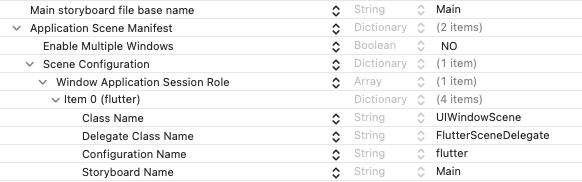
#UISceneDelegate 必須在應用的 Info.plist 或 application:configurationForConnectingSceneSession:options: 中指定。如果未指定 UISceneDelegate,Flutter 工具會嘗試自動編輯 Info.plist,因此除了再次執行 flutter run 或 flutter build 之外,可能不需要任何操作。可以透過將以下內容新增到 Info.plist 來手動升級專案。FlutterSceneDelegate 是 Flutter 框架中執行 UISceneDelegate 的新類。
<?xml version="1.0" encoding="UTF-8"?>
<!DOCTYPE plist PUBLIC "-//Apple//DTD PLIST 1.0//EN" "http://www.apple.com/DTDs/PropertyList-1.0.dtd">
<plist version="1.0">
<dict>
 <key>UIApplicationSceneManifest</key>
 <dict>
  <key>UIApplicationSupportsMultipleScenes</key>
  <false/>
  <key>UISceneConfigurations</key>
  <dict>
  <key>UIWindowSceneSessionRoleApplication</key>
    <array>
      <dict>
        <key>UISceneClassName</key>
        <string>UIWindowScene</string>
        <key>UISceneDelegateClassName</key>
        <string>FlutterSceneDelegate</string>
        <key>UISceneConfigurationName</key>
        <string>flutter</string>
        <key>UISceneStoryboardFile</key>
        <string>Main</string>
      </dict>
    </array>
   </dict>
 </dict>
</dict>
如 Xcode 編輯器所示
在 application:didFinishLaunchingWithOptions: 中建立平臺通道
#以程式設計方式建立 FlutterViewController 的應用程式可以像以前一樣繼續執行。依賴 Storyboards(和 XIBs)在 application:didFinishLaunchingWithOptions: 中建立平臺通道的應用程式現在應該使用 FlutterPluginRegistrant API 來完成相同的操作。
之前
#@UIApplicationMain
@objc class AppDelegate: FlutterAppDelegate {
override func application(
_ application: UIApplication,
didFinishLaunchingWithOptions launchOptions: [UIApplication.LaunchOptionsKey: Any]?) -> Bool {
let controller : FlutterViewController = window?.rootViewController as! FlutterViewController
let batteryChannel = FlutterMethodChannel(name: "samples.flutter.dev/battery",
binaryMessenger: controller.binaryMessenger)
batteryChannel.setMethodCallHandler({
[weak self] (call: FlutterMethodCall, result: FlutterResult) -> Void in
// This method is invoked on the UI thread.
// Handle battery messages.
})
GeneratedPluginRegistrant.register(with: self)
return super.application(application, didFinishLaunchingWithOptions: launchOptions)
}
}@implementation AppDelegate
- (BOOL)application:(UIApplication*)application didFinishLaunchingWithOptions:(NSDictionary*)launchOptions {
FlutterViewController* controller = (FlutterViewController*)self.window.rootViewController;
FlutterMethodChannel* batteryChannel = [FlutterMethodChannel
methodChannelWithName:@"samples.flutter.dev/battery"
binaryMessenger:controller.binaryMessenger];
[batteryChannel setMethodCallHandler:^(FlutterMethodCall* call, FlutterResult result) {
// This method is invoked on the UI thread.
// TODO
}];
[GeneratedPluginRegistrant registerWithRegistry:self];
return [super application:application didFinishLaunchingWithOptions:launchOptions];
}
@end之後
#@UIApplicationMain
@objc class AppDelegate: FlutterAppDelegate, FlutterPluginRegistrant {
override func application(
_ application: UIApplication,
didFinishLaunchingWithOptions launchOptions: [UIApplication.LaunchOptionsKey: Any]?) -> Bool {
pluginRegistrant = self
return super.application(application, didFinishLaunchingWithOptions: launchOptions)
}
func register(with registry: any FlutterPluginRegistry) {
let registrar = registry.registrar(forPlugin: "battery")
let batteryChannel = FlutterMethodChannel(name: "samples.flutter.dev/battery",
binaryMessenger: registrar!.messenger())
batteryChannel.setMethodCallHandler({
[weak self] (call: FlutterMethodCall, result: FlutterResult) -> Void in
// This method is invoked on the UI thread.
// Handle battery messages.
})
GeneratedPluginRegistrant.register(with: registry)
}
}@interface AppDelegate () <flutterpluginregistrant>
@end
@implementation AppDelegate
- (BOOL)application:(UIApplication*)application didFinishLaunchingWithOptions:(NSDictionary*)launchOptions {
self.pluginRegistrant = self;
return [super application:application didFinishLaunchingWithOptions:launchOptions];
}
- (void)registerWithRegistry:(NSObject<flutterpluginregistry>*)registry {
NSObject<flutterpluginregistrar>* registrar = [registry registrarForPlugin:@"battery"];
FlutterMethodChannel* batteryChannel = [FlutterMethodChannel
methodChannelWithName:@"samples.flutter.dev/battery"
binaryMessenger:registrar.messenger];
[batteryChannel setMethodCallHandler:^(FlutterMethodCall* call, FlutterResult result) {
// This method is invoked on the UI thread.
// TODO
}];
[GeneratedPluginRegistrant registerWithRegistry:registry];
}
@end透過 FlutterAppDelegate 以程式設計方式設定 FlutterPluginRegistrant。
在 application:didFinishLaunchingWithOptions: 中註冊外掛
#大多數舊的 Flutter 專案在應用程式啟動時使用 GeneratedPluginRegistrant 註冊外掛。GeneratedPluginRegistrant 物件會在後臺註冊平臺通道,並且應該像 平臺通道正在遷移一樣進行遷移。這將避免使用 FlutterLaunchEngine 的任何執行時警告。
@UIApplicationMain
@objc class AppDelegate: FlutterAppDelegate, FlutterPluginRegistrant {
  override func application(
      _ application: UIApplication,
      didFinishLaunchingWithOptions launchOptions: [UIApplication.LaunchOptionsKey: Any]?) -> Bool {
    pluginRegistrant = self
    return super.application(application, didFinishLaunchingWithOptions: launchOptions)
  }

  func register(with registry: any FlutterPluginRegistry) {
    GeneratedPluginRegistrant.register(with: registry)
  }
}@interface AppDelegate () <flutterpluginregistrant>
@end
@implementation AppDelegate
- (BOOL)application:(UIApplication*)application didFinishLaunchingWithOptions:(NSDictionary*)launchOptions {
self.pluginRegistrant = self;
return [super application:application didFinishLaunchingWithOptions:launchOptions];
}
- (void)registerWithRegistry:(NSObject<flutterpluginregistry>*)registry {
[GeneratedPluginRegistrant registerWithRegistry:registry];
}
@end專用 FlutterViewController 用法
#對於出於建立平臺通道以外的原因而在 application:didFinishLaunchingWithOptions: 中從 Storyboards 例項化的 FlutterViewController 的應用程式,它們有責任適應新的初始化順序。
遷移選項
- 子類化
FlutterViewController並將邏輯放在子類的awakeFromNib中。 - 在
Info.plist或UIApplicationDelegate中指定UISceneDelegate,並將邏輯放在scene:willConnectToSession:options:中。有關更多資訊,請參閱 Apple 的文件。
示例
#@objc class MyViewController: FlutterViewController {
override func awakeFromNib() {
self.awakeFromNib()
doSomethingWithFlutterViewController(self)
}
}時間線
#- 生效版本:尚未釋出
- 穩定版本:尚未釋出
- 未知:Apple 將其警告更改為斷言,並且尚未採用
UISceneDelegate的 Flutter 應用將在最新 SDK 上啟動時崩潰。
參考資料
#- 問題 167267 - 最初報告的問題。
- Apple 關於指定
UISceneDelegate的文件